Ever turned in an essay and later realized it wasn’t your best work?
You’re not alone. Many students spend hours writing but skip the final (and most important) step: editing. Editing isn’t just about fixing typos—it’s how you turn a rough draft into a strong, clear, and polished final version.
Whether you’re writing a high school assignment or a college paper, learning how to edit an essay can help you catch errors, improve flow, and strengthen your ideas. It’s also a key skill that sets apart good essays from great ones.
Editing becomes easier when your essay is built on a solid foundation. If your draft lacks structure or has a weak thesis, no amount of polishing will make it shine. That’s why understanding how to write an essay—from organizing ideas to crafting a strong introduction—is the first step. Once you have a well-planned draft, editing transforms into fine-tuning rather than rewriting.
In this blog, you’ll learn:
- What editing actually means (and how it’s different from proofreading)
- A step-by-step editing checklist
- Common mistakes to avoid
- Tools and techniques to edit faster and better
Let’s dive in and make your writing shine.
What Does It Mean to Edit an Essay?
Editing an essay goes far beyond checking for spelling errors. It’s a focused process that helps improve the clarity, flow, structure, and strength of your ideas. Think of editing as shaping your rough draft into its most effective version—where every paragraph supports your thesis and every sentence reads smoothly.
Before we dive into the steps, it’s important to understand how editing compares to other stages of post-writing:
Editing vs Revising vs Proofreading
| Process | Focus Area | When to Do It |
| Revising | Big-picture changes like structure, argument, and content | First read-through after drafting |
| Editing | Sentence-level improvements—clarity, flow, grammar, tone | After revising, before proofreading |
| Proofreading | Surface-level errors like typos, punctuation, spacing | Final step before submission |
When you edit an essay, you’re tightening language, fixing awkward phrasing, improving transitions, and checking grammar—all while making sure your voice remains consistent. Unlike revising, which might involve rewriting sections or rethinking your argument, editing focuses on refining what’s already on the page.
You’ll also make sure that:
- Your thesis statement is strong and well-placed
- Each paragraph has a clear topic sentence
- Transitions between ideas feel natural
- The tone matches the assignment’s purpose (formal, persuasive, narrative, etc.)
- Citations and formatting are accurate (APA, MLA, etc.)
Effective editing requires a fresh perspective—sometimes, that means stepping away from your draft before returning to it. Other times, it means using tools or asking for feedback to catch what your eyes might miss.
Pre-Editing Checklist: Get Ready Before You Edit
Before you jump into editing your essay, it helps to pause and reset your perspective. Editing is most effective when you’re not emotionally attached to every sentence. These pre-editing steps help you approach your work with fresh eyes and better judgment.
Here’s a simple checklist to follow before you begin:
Let It Sit for a Few Hours (or Overnight)
If time allows, take a break after finishing your first draft. Giving your brain time to rest helps you spot awkward phrases, logical gaps, or vague sentences you might miss right after writing.
Read the Essay Aloud
Reading aloud forces you to slow down and hear how your writing flows. You’ll quickly notice clunky transitions, run-on sentences, or areas where your tone feels off.
Print It or Change Your Viewing Mode
Switching the format—like printing it out or viewing it in “Suggesting” mode in Google Docs—tricks your brain into seeing it as new content. That fresh look can make issues stand out more clearly.
Check the Prompt Again
Skim the assignment guidelines or rubric. Is your thesis clearly answering the question? Are you meeting the word count and formatting requirements?
Use a Self-Editing Checklist or Rubric
Many schools provide scoring rubrics that list what teachers are looking for: thesis clarity, organization, grammar, citation, etc. Use that rubric as a guide while editing.
Remove Distractions
Close unnecessary tabs. Turn off notifications. Editing well takes focus, and a clean environment helps you spot mistakes more easily.
Small mindset shifts before editing can dramatically improve your results. Editing isn’t just about “fixing”—it’s about making your essay stronger, smarter, and more impactful.
Step-by-Step: How to Edit an Essay Like a Pro
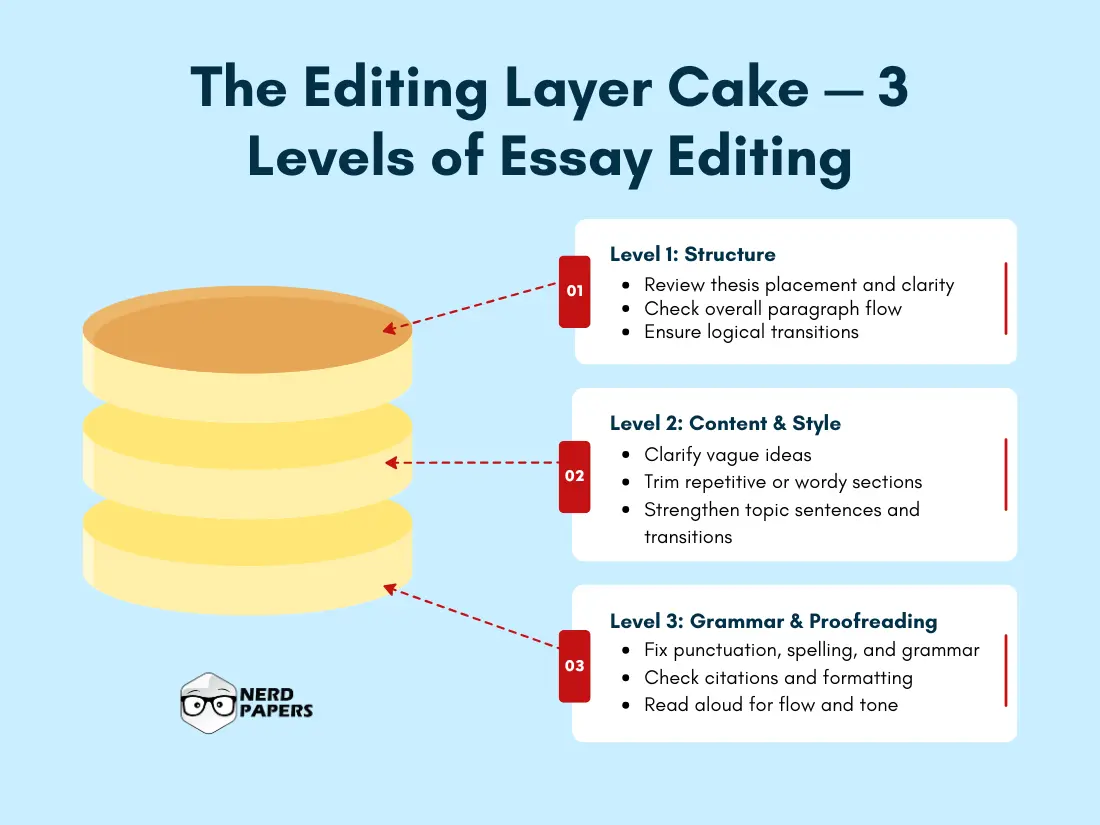
Editing can feel overwhelming if you try to fix everything at once. That’s why it’s best to work in layers—starting with big-picture issues and moving down to sentence-level details. Here’s a step-by-step guide to help you edit effectively and efficiently:
Step 1: Revisit Your Thesis Statement
Your thesis is the core of your essay. Ask yourself:
- Is it clear, specific, and arguable?
- Is it placed at the end of the introduction?
- Does the rest of the essay consistently support it?
If your argument is vague or buried, now’s the time to refine it.
Step 2: Review Essay Structure and Organization
Look at the overall flow:
- Does each paragraph serve a purpose?
- Are the points presented in a logical order?
- Do the introduction, body, and conclusion feel balanced?
If the flow feels choppy or some sections seem out of place, these are signs that the structure needs adjustment. You can also find some good and effective essay writing tips, one our another blog which breaks down how to build essays that are clear, focused, and easy to edit later on.
Step 3: Improve Paragraph Flow and Transitions
Each paragraph should begin with a clear topic sentence and end with a smooth transition. Make sure your ideas don’t jump around or repeat.
Look for weak connectors like “this shows” or “in conclusion” and replace them with stronger transitions:
- Additive: furthermore, in addition
- Contrastive: however, on the other hand
- Sequential: first, next, finally
Step 4: Edit for Clarity and Conciseness
Clarity makes your essay readable. Conciseness keeps it tight.
Fix common issues like:
- Wordy phrases (due to the fact that → because)
- Repetition (very, really, actually)
- Unnecessary filler sentences
- Ambiguous or vague language
Tools like Hemingway Editor or Grammarly can help here.
Step 5: Strengthen Sentence-Level Grammar and Tone
This is where you fine-tune your language:
- Fix run-on or fragmented sentences
- Correct verb tense errors
- Use an academic tone (avoid slang or contractions)
- Make sure punctuation is accurate
🧠 Pro Tip: Read the essay backward, sentence by sentence, to spot grammar issues more clearly.
Step 6: Check Formatting and Citations
Whether you’re using APA, MLA, or Chicago, make sure:
- In-text citations match your reference list
- Font, spacing, and margins follow your professor’s guidelines
- Titles, headers, and page numbers are consistent
Step 7: Proofread One Last Time
Do one final scan to catch typos, extra spaces, or awkward breaks. This is your last chance to polish before submission.
Using “Track Changes” in Word or “Suggesting Mode” in Google Docs makes editing cleaner—and helps if you’re sharing with a peer editor.
Next, we’ll cover the top tools and resources to help you edit faster and better—even when you’re on a tight deadline.
Tools and Resources to Help You Edit Smarter
You don’t have to edit your entire essay alone—or manually. Today’s writing tools can help you spot grammar issues, tighten your sentences, and even improve clarity. The key is to use them wisely—as assistants, not as replacements.
Here are some trusted tools that can speed up and improve your editing process:
Grammarly (Free + Premium)
Perfect for catching grammar mistakes, spelling errors, and awkward sentence structures. The premium version also checks tone, conciseness, and clarity.
Best for: Real-time grammar and style fixes.
Hemingway Editor
Helps simplify complex sentences, eliminate passive voice, and improve readability. It highlights dense or confusing sections so you can rewrite with clarity.
Best for: Making your writing clear and punchy.
Google Docs – Suggesting Mode
If you’re editing your own essay or collaborating with a peer, use Suggesting Mode to track edits without changing the original text. This is ideal for revisions and feedback.
Best for: Collaborative editing or reviewing your changes.
Microsoft Word – Track Changes
Track Changes is similar to Google Docs’ suggestions but in Word. It lets you revise without losing the original content—great for reviewing before finalizing.
Best for: Offline editing and detailed formatting adjustments.
AI Editing Assistants (Use with Care)
AI chatbots like ChatGPT can help review flow, rewrite awkward sentences, or suggest alternative phrasings. However, always review edits critically—don’t rely on AI to preserve your tone or intent.
Best for: Generating ideas or polishing rough sentences (with oversight).
Peer Review & Feedback
Don’t underestimate the power of human input. Ask a classmate, tutor, or mentor to review your essay and point out unclear or weak sections. They’ll often catch what tools miss.
Best for: Honest, helpful second opinions.
Tip: Use multiple tools in layers—start with Grammarly, then use Hemingway for clarity, and finish with a human review if possible. Combining resources gives you a more complete edit.
Common Editing Mistakes to Avoid
Even with the best tools and intentions, it’s easy to overlook certain issues during editing—especially when you’re too close to your own writing. Recognizing the most common editing slip-ups can help you catch more errors and turn in a cleaner, stronger essay.
Here are some mistakes students often make during the editing process—and how to avoid them:
Overlooking Weak Thesis Statements
Sometimes, you get so focused on fixing grammar that you forget to double-check your central argument. Make sure your thesis is:
- Clear and specific
- Placed at the end of your introduction
- Supported by every paragraph in the body
Ignoring Flow Between Paragraphs
Disconnected ideas can confuse your reader. Look for abrupt transitions, paragraphs that jump topics, or repetition. Use strong linking phrases like however, as a result, or in contrast to create smoother progression.
Overusing Filler Words
Words like very, really, actually, and just can clutter your writing. Try removing them to tighten your sentences and improve impact.
Skipping Citation Checks
Many students forget to edit their citations or reference list. Be sure to:
- Match every in-text citation with a source
- Format your references correctly (APA, MLA, Chicago, etc.)
- Check punctuation and order carefully
Editing Too Soon
Jumping into edits right after writing often leads to missed errors. Let your draft sit for a while so you can review it with fresh eyes.
Relying Too Heavily on AI or Spellcheck
Grammar tools are helpful—but they don’t understand your intent. Always read your essay manually after using software tools to ensure your tone and meaning stay intact.
Changing Too Much, Too Fast
Editing isn’t rewriting. Don’t over-edit to the point where you lose your original voice or overcomplicate your sentences.
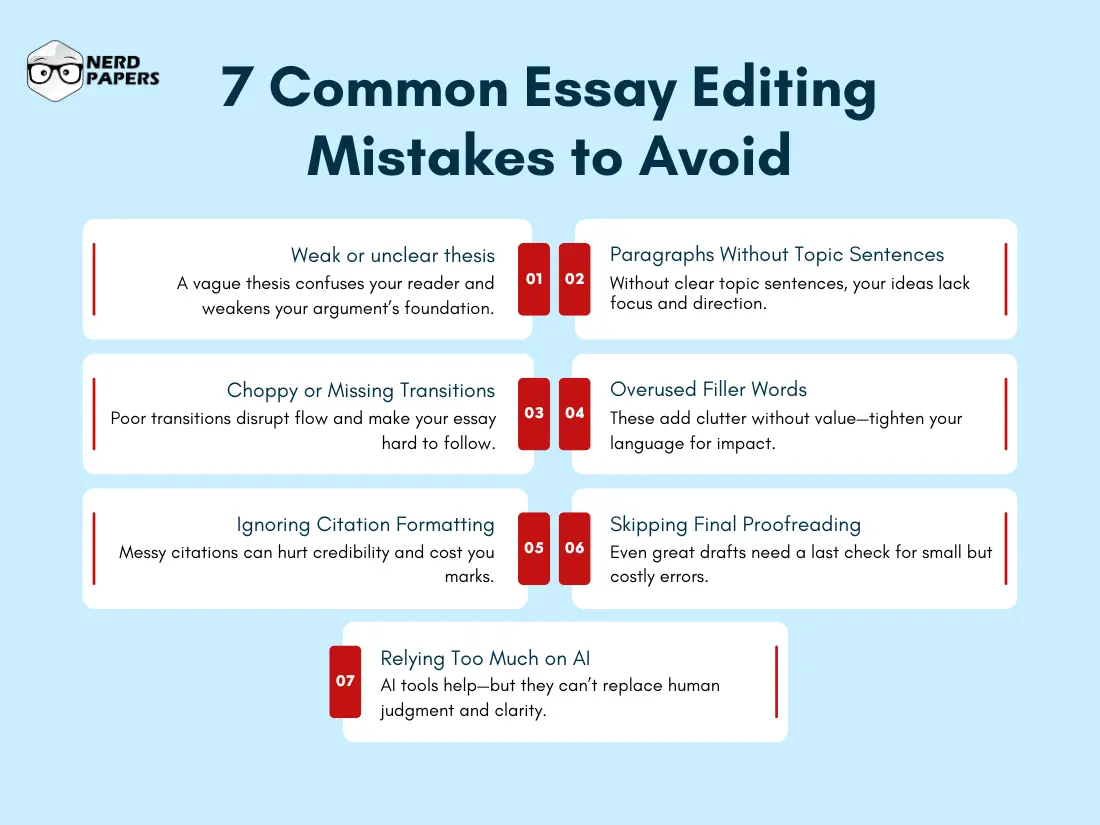
Pro Tip: Create a short checklist based on these common errors and keep it beside you as you review your draft. A focused approach prevents you from falling into these easy traps.
How Long Does It Take to Edit an Essay?
One of the most common questions students ask is:
“How long should editing take?”
The answer depends on several factors—like your essay length, how strong your first draft is, and how comfortable you are with editing. But here’s a general breakdown to help you plan:
⏱️ Estimated Editing Time by Essay Length
| Essay Length | Estimated Editing Time |
| 500 words | 20–30 minutes |
| 1000 words | 45–60 minutes |
| 1500–2000 words | 1.5–2.5 hours |
| Over 3000 words | 3+ hours (may require multiple rounds) |
What Affects Editing Time?
- Quality of your first draft: A clear, well-structured draft will take less time to edit.
- Your familiarity with the topic: If you understand the subject well, you’ll spend less time reviewing arguments.
- Use of tools: Grammar and editing tools can speed things up—but always double-check their suggestions.
- Whether you’re editing in one sitting or over days: Breaks improve clarity but extend the total editing timeline.
💡 Tips to Manage Editing Time Effectively:
- Use the Pomodoro technique: 25-minute focus sessions with 5-minute breaks
- Edit in layers: Start with structure → content → grammar → formatting
- Set a timer for each stage so you don’t over-fix minor issues too early
- Leave buffer time between writing and editing whenever possible
Even a short essay deserves focused editing. Rushing this step increases the risk of small mistakes that could cost you points—or weaken your argument.
Self-Editing vs. Peer Editing: Which Should You Use?
When it comes to polishing your essay, you have two main options: edit it yourself or get someone else to review it. Both methods have value—and using them together often leads to the best results.
Let’s break it down:
Self-Editing: Best for Deep Familiarity
You know your topic, tone, and argument best. Self-editing gives you control and lets you spot issues related to your intent and logic.
Benefits:
- You catch mistakes specific to your content
- Helps you understand your writing patterns and weaknesses
- Teaches you how to revise more effectively over time
Limitations:
- You’re likely to miss obvious errors due to “writer’s blindness”
- It’s harder to assess clarity when you already know what you meant
Peer Editing: Best for Fresh Perspective
A peer sees your work with unbiased eyes and can point out confusing sections or gaps in reasoning.
Benefits:
- Offers honest feedback from a reader’s point of view
- Highlights areas where your meaning isn’t clear
- Encourages dialogue and critical thinking
Limitations:
- Depends on the peer’s skill level and attention
- May result in conflicting feedback if not guided properly
Best Practice: Combine Both
- Start with self-editing to fix known issues
- Then use peer editing to catch what you missed
- Follow up with a final pass to integrate and refine changes
📌 If you’re unsure how to give or receive feedback, use a simple peer editing checklist that focuses on thesis clarity, argument strength, grammar, and structure.
How to Edit an Essay Quickly (When You’re Out of Time)
Let’s face it—sometimes you’re editing with the clock ticking. Maybe the deadline’s tonight, or you just finished writing and only have a short window to polish things up.
Here’s how to edit your essay quickly and efficiently without compromising too much quality:
Step 1: Prioritize High-Impact Fixes First
Start with what matters most:
- Is your thesis clear and placed properly?
- Does every paragraph support that thesis?
- Are transitions smooth enough to keep your argument flowing?
If the core structure is off, no amount of grammar fixes will help—so address that first.
Step 2: Trim the Fluff
Cut out:
- Repetitive phrases
- Empty words (really, very, actually)
- Long-winded sentences that can be shortened
Use tools like Hemingway Editor to highlight wordiness and dense sentences.
Step 3: Scan for Grammar and Punctuation
Use Grammarly, Word’s built-in checker, or Google Docs’ suggestions. But don’t rely on them blindly—scan each suggestion to make sure it fits the tone and meaning.
Focus especially on:
- Subject-verb agreement
- Run-on sentences
- Comma placement
- Consistent verb tenses
Step 4: Double-Check the Introduction and Conclusion
These two sections shape your reader’s impression. Make sure:
- Your introduction hooks attention and clearly states the thesis
- Your conclusion wraps things up without adding new points
Step 5: Proofread Visually
Quick tricks:
- Zoom in or print it out
- Read it backward (from last sentence to first)
- Use a highlighter to mark weak areas as you go
Even 10–15 minutes of focused proofreading can fix critical errors.
⏳ Time-Saving Tip: If you only have 10 minutes, edit your thesis, topic sentences, and conclusion. These three parts shape how your essay is understood—and graded.
Final Thoughts: Small Edits, Big Impact
Editing isn’t just a final step—it’s what transforms a decent essay into a powerful, polished piece of writing. Whether you’re reviewing a 500-word reflection or a 3000-word research paper, taking the time to edit can dramatically improve clarity, flow, and credibility.
Here’s a quick recap of what we covered:
- What editing really involves—and how it’s different from revising or proofreading
- How to prepare before editing for maximum impact
- Step-by-step techniques to edit like a pro
- Tools to speed up and sharpen your process
- Common mistakes to watch out for
- Time management tips for last-minute edits
- How and when to use peer editing alongside self-review
Remember: even the best ideas can fall flat if they’re buried under clunky sentences or disorganized arguments. Editing helps your voice shine, your message land, and your grades improve.
FAQs: How to Edit an Essay
How do I know if my essay is well-edited?
A well-edited essay:
Has a clear, focused thesis
Follows a logical structure
Uses smooth transitions between ideas
Is free of grammar, spelling, and punctuation errors
Sounds natural and consistent in tone
You can also test it by reading it aloud—if it flows smoothly and makes sense from start to finish, you’re on the right track.
What’s the difference between editing and proofreading?
Editing focuses on improving clarity, flow, structure, and word choice.
Proofreading is the final step and focuses on catching small errors like typos, punctuation, and formatting issues.
Should I edit my essay right after writing it?
If possible, wait a few hours or overnight before editing. This helps you return with a fresh perspective and catch more mistakes. If you’re in a rush, take at least a short break before reviewing.
Can AI tools like Grammarly or ChatGPT fully edit my essay?
AI tools are great support tools, but they shouldn’t replace human judgment. They can catch grammar and style issues, but they might not fully understand your tone, context, or argument. Always review their suggestions before accepting them.
How many times should I edit an essay?
It depends on the importance of the essay and how polished your draft is. For major assignments:
Do a structural edit
Then a sentence-level edit
Finally, a proofreading pass
Three rounds are ideal, but even one focused pass is better than none.
Is peer editing better than self-editing?
They’re best used together. Self-editing helps you clarify your ideas, while peer editing gives you an outside perspective. Combining both improves the overall quality of your work.